AI MVP Workflow 2026
Building an MVP with AI — the complete workflow from idea to launch
The only guide that names the full AI MVP workflow: Clarity, Design, Validate, Build, Ship. With copy-paste prompts, realistic costs, and the GDPR check international guides skip.
Building an MVP with AI in 2026 does not mean prompting until it runs. It means working in five phases: sharpen the problem, lock the scope, fix the data model and architecture, only then generate — and review it with human eyes at the end. AI accelerates implementation, not decisions. Skip the first three phases and you save days, then lose weeks to security, data model, and rework.
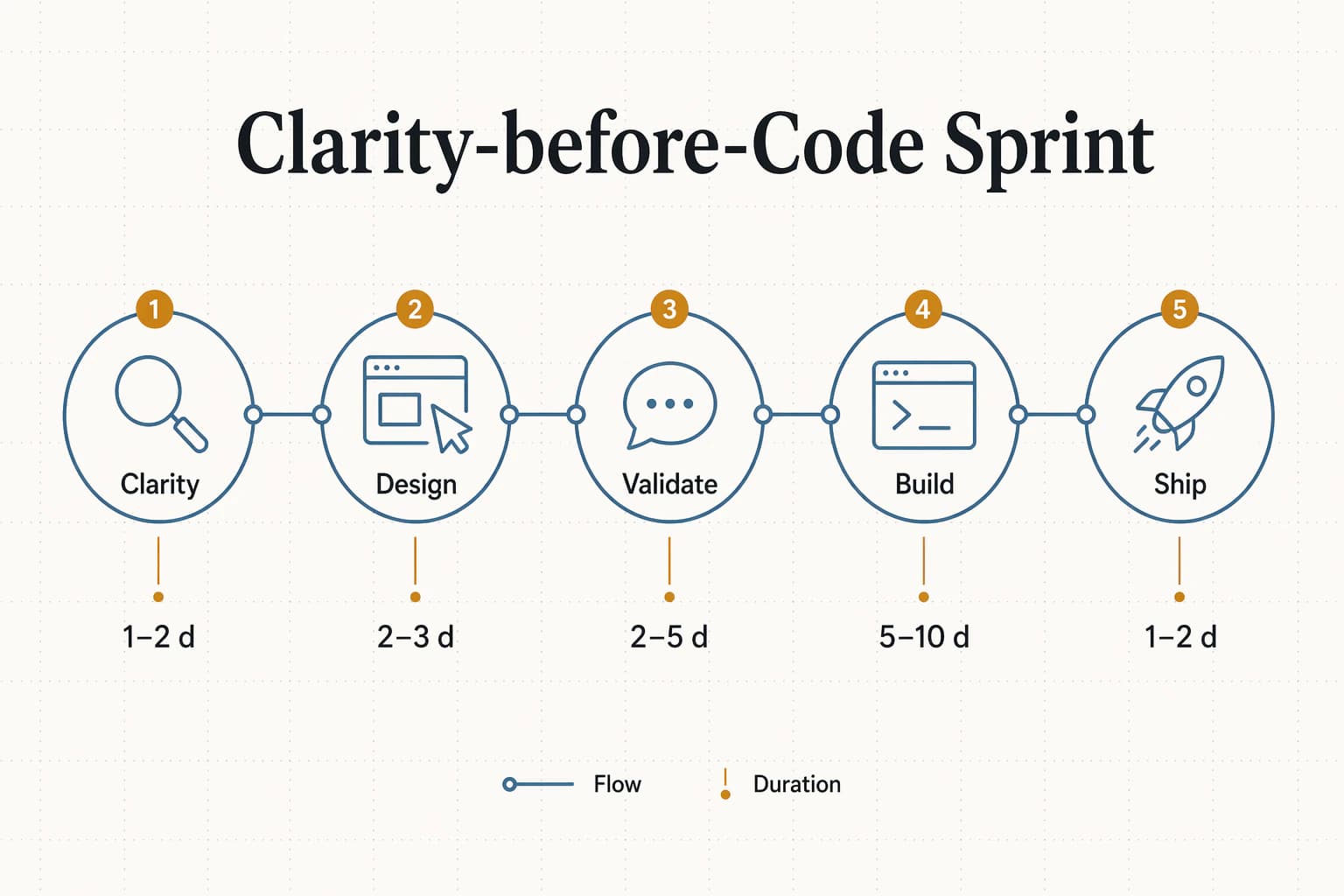
TL;DR — the 5 key points
- An AI MVP ships in 2–4 weeks instead of 4–7 months — if you follow the Clarity-before-Code Sprint.
- The core: five phases — Clarity, Design, Validate, Build, Ship. No one writes code before problem and prototype are verified.
- Realistic cost range: €5,000–15,000 including labour. Pure tool costs stay under €200/month.
- 2026 tech stack: Figma for design, Claude Code + Cursor for code, Supabase for backend, Vercel for deploy, Plausible for analytics.
- GDPR check: Supabase EU region + DPA, Vercel fra1, Plausible instead of Google Analytics. Otherwise every launch email is a liability.
Why 2026 changes everything — and what actually got faster
Until 2023, an MVP was a marathon: four to seven months of development, €30,000–80,000 investment, and at the end the verdict of whether the market plays along. Today teams ship MVPs in two to four weeks — not because they type faster, but because AI dissolved three hard bottlenecks: concept work, UI creation, and translating design into code.
The key point: The acceleration doesn't come from coding itself. It comes from phases that used to happen separately now fitting into one flow. A founder can structure a feature set with Claude in the morning, click through a Figma prototype at noon, run five users over it in the afternoon, and build the first modules with Claude Code in the evening. That was physically impossible in 2022.
The consequence: the cost of a wrong product assumption drops by an order of magnitude. What burned €60,000 three years ago before anyone knew the problem didn't exist now costs €10,000 and saves six months. Validation doesn't become optional — it becomes economically sensible.
Three generations of MVP workflows
Anyone choosing an MVP workflow today picks between three paradigms. They're not mutually exclusive, but the combination that dominates in 2026 is clear:
Generation 1 · 2010–2018
Code-first
Every line by hand. MVPs take 4–6 months, teams of three or more.
Ruby on Rails, Django, React
Generation 2 · 2018–2023
No-Code
Drag-and-drop builders. MVPs in 4–8 weeks, limited scaling and control.
Bubble, Webflow, Softr
Generation 3 · 2023–today
AI-native
AI writes code, humans review and deploy. MVPs in 2–4 weeks with full stack.
Claude Code, Cursor, v0, Lovable
The combination that works in 2026: AI-native for build and design, classic product discipline for the upstream phases. AI-only teams build the wrong thing fast. Classic-only teams build the right thing slowly.
The Clarity-before-Code Sprint: the 5-phase framework
The Clarity-before-Code Sprint is our named framework for AI-powered MVP development: five stacked phases where each one produces a concrete output the next needs as input. The name is deliberate — decivo's guiding principle "Clarity Before Code" describes exactly the discipline that separates this workflow from pure vibe-coding: nobody writes code before problem, priority, and prototype reaction are clear.
Core definition (citable)
„The Clarity-before-Code Sprint is a 5-phase framework for AI-powered MVP development that interlocks problem scope, design validation, and code production tightly enough to ship a functional MVP in 2–4 weeks — instead of 4–7 months in classic setups.“
The five phases at a glance
| Phase | Name | Goal | Tools | Output | Time |
|---|---|---|---|---|---|
| 1 | Clarity | Define the problem, prioritise features | Claude, ChatGPT, Notion | One-page product brief + feature map | 1–2 days |
| 2 | Design | Clickable prototype in the target style | Figma, Figma Make, v0 | Testable high-fidelity prototype | 2–3 days |
| 3 | Validate | Test assumptions with real users | Maze, Lookback, Calendly | Prioritised change list | 2–5 days |
| 4 | Build | Functional code with real backend | Claude Code, Cursor, Supabase | Deploy-ready MVP | 5–10 days |
| 5 | Ship | Go live, measure, iterate | Vercel, Plausible, PostHog | Live product with feedback pipeline | 1–2 days |
Phase 1 — Clarity: define problem & features with AI
Most MVPs fail on the wrong feature set, not on the tech. Phase 1 answers three questions before anyone opens Figma: Which problem does this product concretely solve? Which features belong in the MVP and which explicitly don't? Which assumption is so central that its failure topples the entire project?
MoSCoW for MVP features
- Must-Have: without these, the core use case doesn't work. Max three.
- Should-Have: strong but dispensable. Land in V1.1 after launch.
- Could-Have: nice-to-have, backlog. Often revealed as: nobody needs it.
- Won't-Have: explicitly excluded. Documented so nobody sneaks it in during phase 4.
Prompt vault: feature map from problem statement
This is the first LLM call in the sprint — and the decisive one. Copy it, fill the four placeholders, and use the result as a discussion basis, not final truth:
You are a Senior Product Owner with 10 years of startup experience.

Context:
- Problem: [ONE SENTENCE — what annoys users today?]
- Target audience: [WHO has the problem — as specific as possible]
- Current workaround: [HOW do they solve it today? Excel? Competitor product?]
- My USP: [WHAT makes our solution different?]

Task:
1. Formulate 5 core hypotheses the MVP must prove or disprove.
2. Build a MoSCoW-prioritised feature map (max 3 must-haves).
3. Name the riskiest assumption — the one whose failure makes everything else irrelevant.
4. Give me three ways to test this assumption with real humans in under 5 days.

Format: Markdown, tables where useful.
Output: a one-page product brief plus feature map. If the brief doesn't fit on one A4 page, the scope isn't tight enough.
Phase 2 — Design: clickable prototype in Figma
Design before code is the second-most-important principle after clarity. A clickable Figma prototype answers in two days what would take two weeks in code: Is the information architecture clear? Where does the flow snag? Which components actually repeat?
The rule: prototypes are built so they can be tested. That means at least one clickable happy path, real copy (no lorem ipsum), and a version that works on a phone. Everything else is a mood board.
Three ways to a prototype
Figma classic
Auto Layout, components, variants. Full control, highest learning curve.
Figma Make / v0
Generative tools that build prototypes from text prompts or screenshots. Faster start, less polish.
Paper click-through
Legitimate for early rounds. Not pretty, but tests the structure instead of the aesthetics.
Prompt vault: copy audit for prototype screens
Once screens are in place, run the copy through this review — ideally with Claude or ChatGPT on the second monitor:
You are a UX writer. I will post screenshots from a Figma MVP prototype.

For each screen rate:
1. Does a first-time user understand in under 5 seconds what happens here?
2. Is there jargon that needs translating into user language?
3. Is the primary CTA unambiguous — and does it deliver on the screen's need?

Format per screen:
- Clarity (1–5) + one-sentence reason
- Concrete copy changes with before/after
- A risk flag if the screen breaks the flow.
Phase 3 — Validate: UX testing with real users
Between prototype and code sits the most important checkpoint of the whole sprint. Five real users on the prototype surface over 75% of usability issues per Nielsen/Norman — more than any dashboard, AI review, or team discussion.
Pre-check with AI personas (optional, but powerful)
Before inviting real humans, spend an hour running three AI personas through the prototype. This doesn't replace real users — but it finds the dumb errors before five calendar slots are blocked.
Prompt vault: AI-persona prototype review
You are [PERSONA — e.g. "founder of a trades business, 42, low tech affinity"].

You see this prototype for the first time: [screenshot or Figma link].

Walk through the flow and tell me, in first person:
1. What don't you understand on the first screen?
2. What would you click first — and why?
3. At which point would you bail?
4. What's missing for you to trust the product?

No marketing speak. Write like you'd order a beer for yourself.
The real user test
Five users, each alone, 30 minutes on Zoom, screen recording with consent. The three questions that deliver the most insight:
- 01"Show me how you'd solve [CORE TASK]." — Observe, don't help.
- 02"Where were you unsure what happens next?" — After every flow.
- 03"What would this product need to do for you to buy it today?" — At the end.
Output: a prioritised change list — split into "fix before build" and "V1.1 backlog". Changes mentioned by three of five users are must-fix.
Phase 4 — Build: functional code with Claude Code and Cursor
Only now do you build. Teams that discover in phase 4 that a feature isn't needed or a flow was wrong didn't take the earlier phases seriously — and pay the rework tax.
The tech stack we default to in 2026
Frontend
Next.js 16 + Tailwind CSS v4
React Server Components, solid DX tooling, AI tools are trained on it.
Backend
Supabase (Postgres + Auth + Storage)
GDPR region in Frankfurt, auth out-of-the-box, row-level security.
Hosting
Vercel (region fra1)
Edge deployment, preview URLs, automatic preview per commit.
AI coding
Claude Code (terminal) + Cursor (IDE)
Autonomous tasks in Claude Code, interactive pair programming in Cursor.
When Claude Code, when Cursor?
- Claude Code for: new features, refactors, test suites — anything with a clear task description.
- Cursor for: debugging, UI polish, Tailwind tweaks, rapid multi-file edits.
Prompt vault: CLAUDE.md boilerplate for a new MVP
The first commit of every project: a CLAUDE.md at the repo root that gives Claude Code the context nobody else writes down. This template saves you half a day of explaining per feature loop:
# Project: [NAME]

## Context
- Product: [one sentence, what it does]
- Target audience: [who uses it, which problem it solves]
- Current phase: MVP (Clarity-before-Code Sprint, phase 4)

## Tech stack
- Framework: Next.js 16 App Router + TypeScript strict
- Styling: Tailwind CSS v4 with CSS variables in globals.css
- Backend: Supabase (EU region), row-level security on every table
- Auth: Supabase Auth with email + magic link
- Testing: Vitest + Playwright for flows

## Conventions
- Components under src/components/
- Server actions instead of API routes when possible
- No WHAT-comments in code — only WHY on real surprises
- UI strings always via dictionary in src/dictionaries/en.ts

## What NOT to do
- No new dependencies without asking
- No structural refactors without plan mode
- No commenting-out — delete dead code
Prompt vault: Supabase row-level security in 3 minutes
I'm building a Supabase table "[TABLE]" with columns:
[COLUMNS with types].

Generate for me:
1. The CREATE TABLE statement with all constraints.
2. Row-level security policies for:
   - SELECT: user only sees their own rows (user_id = auth.uid())
   - INSERT: user can only insert with their own user_id
   - UPDATE: only own rows, only specific fields
   - DELETE: only own rows
3. A seed entry for local testing.

Format: SQL block, directly paste-able into Supabase editor.
Phase 5 — Ship: deploy, analytics, the first 48 hours
Vercel deployment takes under five minutes with a clean Next.js setup: connect repository, set environment variables, hit deploy. The critical steps happen before and after — not at deploy time.
The 5-point prelaunch check
- 1Custom domain + SSL set (Vercel handles SSL automatically)
- 2Imprint and privacy page live — both GDPR-mandatory in Germany, even for MVPs
- 3Analytics wired up (Plausible EU-hosted or PostHog self-hosted)
- 4Error logging active — at minimum structured JSON console logs, ideally GlitchTip or Sentry
- 5A feedback opt-in: a button "What's missing?", answers land in your inbox
The first 48 hours after launch
Resonance measurement in three steps: hour 0–24 is bug-fixing time, hour 24–48 is conversion measurement, from day 3 the iteration loop begins. Pushing radical features in the first 48 hours confuses early users and overloads your own system.
MVP & GDPR: using Supabase, AI tools, and EU servers right
Every international AI MVP guide skips this section. For German founders it's where a fast launch becomes an expensive precedent. The good news: four concrete settings keep the entire stack GDPR-compliant.
Supabase
Select project region Frankfurt (eu-central-1) or Dublin (eu-west-1) + request DPA via supabase.com/dashboard/org/_/legal.
Vercel
Set production region to fra1. Default is iad1 (Washington) — otherwise data leaves the EU.
Analytics
Plausible (EU-hosted) or PostHog self-hosted. Google Analytics can't run cookie-banner-free in Germany.
AI tools
No personal user data in Claude or ChatGPT prompts. Synthetic test data is enough for code generation.
Not legal advice. For the concrete compliance of your product — especially around health, finance, or children's data — buy an hour with a privacy specialist. That hour pays back tenfold on the first GDPR call.
Costs: classic agency vs. Clarity-before-Code Sprint
The table below is based on three real decivo projects from Q1 2026 and the benchmark of classic agency quotes from the same period. AI sprint numbers include labour of a two-person team at industry day rates — not only tool costs.
Time and cost comparison per phase
| Phase | Classic agency | Clarity-before-Code Sprint | Savings |
|---|---|---|---|
| Concept & feature scope | 2–3 weeks | 1–2 days | ~80% |
| UI/UX design & prototype | 3–4 weeks | 2–3 days | ~85% |
| UX validation | 2 weeks (often skipped) | 2–5 days | Actually happens |
| Development | 2–4 months | 5–10 days | ~85% |
| Deployment & analytics | 1–2 weeks | 1–2 days | ~90% |
| Total | 4–7 months / €30,000–80,000 | 2–4 weeks / €5,000–15,000 | ~80% time · ~75% cost |
Pure tool costs run €100–200/month (Cursor Pro, Claude API, Supabase Pro, Vercel Hobby/Pro, Plausible). Labour is the main cost block — the sprint halves it, it doesn't eliminate it.
From MVP to V1: what comes after launch
An MVP is a starting point, not a goal. What happens next depends on the signal from the first two weeks. Three realistic scenarios:
No interest
Pivot or stop. You invested under €15,000 instead of €80,000 — and spent four weeks instead of six months. An economically bearable learning moment, not a disaster.
Interest with corrections needed
One-week iteration loops. Continue with Claude Code and Cursor. Every change starts again at phase 3 — changes without user feedback are hallucinations.
Product-market fit
Now you scale. From this point the switch from AI-solo to a fixed team makes sense — for quality, security, and the speed that matters at 1000+ users. Details in the separate MVP agency guide.
Who runs this workflow — and when you need decivo
The Clarity-before-Code Sprint is no secret. Any team that knows AI tools, Figma, and a modern stack can run it. The honest question isn't "can we do it ourselves?" but "do we want to learn the workflow now or have the product?".
If you want to learn the workflow yourself
Do it yourself — with our prompts
This article contains every building block. Budget two weeks for the first project and 30% learning overhead. By the second project the workflow clicks.
If you need the result, not the learning curve
decivo compresses the sprint into fixed-price modules
Innovation Workshop (phase 1), Clickable Prototype (phase 2), UX Validation (phase 3), Code Prototype (phase 4). Each module fixed price, deadline to outcome — not hourly billing.
Our positioning: We're not a replacement for a capable founder, but the fastest route through the sprint without two months of tool learning. Teams who book us often continue alone afterwards — because they lived through phases 1–4 with us once.
The Clarity-before-Code Sprint isn't a marketing invention. It's the workflow we ship MVPs with every week. If you want to run it yourself, here's the full blueprint. If you want the sprint facilitated, book a discovery call — 15 minutes, free, no sales script.
Get a concrete take on your project: Book a discovery call — 15 minutes, free, open-ended.
Sources
Every figure in this article comes from the publications below. Where we use our own data, the study is named in the text.
FAQ
Frequently asked questions about the AI MVP workflow
How long does it take to build an MVP with AI?
Two to four weeks suffice for a functional MVP with a real backend if you follow the Clarity-before-Code Sprint. One day for problem scope, two to three days for the prototype, five days for UX testing, one to two weeks for the Claude Code and Cursor build, one day for deploy. If you take longer, the scope was usually too broad — not because the tools were too slow.
What does an AI-powered MVP actually cost?
Between €5,000 and €15,000 in teams that know the workflow — including labour, tools, and ads for the first test. Tool costs alone run €100–200 per month (Cursor Pro, Claude API, Supabase, Vercel, Plausible). Anyone claiming an MVP costs "under €200" is ignoring their own time. For comparison: a classic agency starts at €30,000–80,000.
Claude Code or Cursor — which is better for MVPs?
Both. Claude Code runs autonomously in the terminal and fits structured tasks like new features or refactors. Cursor is the interactive IDE for small edits and debugging. Our rule: Claude Code for features, Cursor for polish. If you pick only one, start with Cursor — the learning curve is gentler.
Do I need coding skills for this workflow?
Yes — at least basic ones. AI tools write the code, but someone must read, understand, and deploy it. If you start with zero coding experience, Figma plus an AI app builder like Lovable or v0 goes further — at the cost of stack control. An honest trade-off: three days invested in Next.js and Supabase basics pays back on every subsequent project.
Is Supabase GDPR-compliant?
Yes, with two settings: set the project region to Frankfurt or Dublin (EU) and request the Data Processing Agreement (DPA) on the Supabase website. Supabase processes non-personal metadata outside the EU, but the EU region is sufficient for personal data. Additionally: set Vercel to region fra1 and use Plausible instead of Google Analytics.
What is the Clarity-before-Code Sprint?
A five-phase framework for AI-powered MVP development distilled from hundreds of decivo project weeks: Clarity, Design, Validate, Build, Ship. The core: no one writes code before problem, feature scope, and user reaction are clear. In our experience this saves 60–80% of later rework.
What if the MVP doesn't resonate after launch?
That's the cheapest possible learning moment. You invested under €15,000 instead of €80,000 — and spent four weeks instead of four months. Systematically check whether target group, problem, solution, or messaging missed. In two out of three cases a pivot on one axis is enough, and the work from phases 1–3 remains reusable.
Can I run this workflow solo?
Technically yes, in practice rarely advisable. Solo founders make it through phase 3 and often stall at phase 4 because debugging with AI is its own discipline. Minimum setup: one person for product and design, one for build. If you stay solo, halve the scope and outsource phase 4 to a team like decivo.
Related articles
20 min read
MVP Tools 2026: The Best Tools Compared
No-code, AI app builders, Claude Code & Cursor — all MVP tools compared. Costs, workflows & decision guide.
Read article14 min read
What Does an MVP Cost? Having an MVP Built in 2026 — Real Prices, Not Ranges
The AI price break: why MVPs are cheaper in 2026 than 2024, traditional agency vs. AI-native studio per MVP type, published fixed prices instead of hourly ranges — plus an interactive cost calculator.
Read article22 min read
Lovable Alternatives 2026: An Honest Comparison + What Actually Helps
Four categories of alternatives — from Bolt.new and Cursor to a Lean Software Studio. With a decision guide, real costs, and the honest question: tool problem or skill problem?
Read article