Lovable alternatives 2026
Lovable Alternatives 2026: An Honest Comparison + What Actually Helps
Hit Lovable's ceiling? Four categories of alternatives — other AI app builders, AI coding assistants, no-code platforms, and Lean Software Studios. With a decision guide, real costs, and an honest answer to whether you actually need a different tool or a partner.
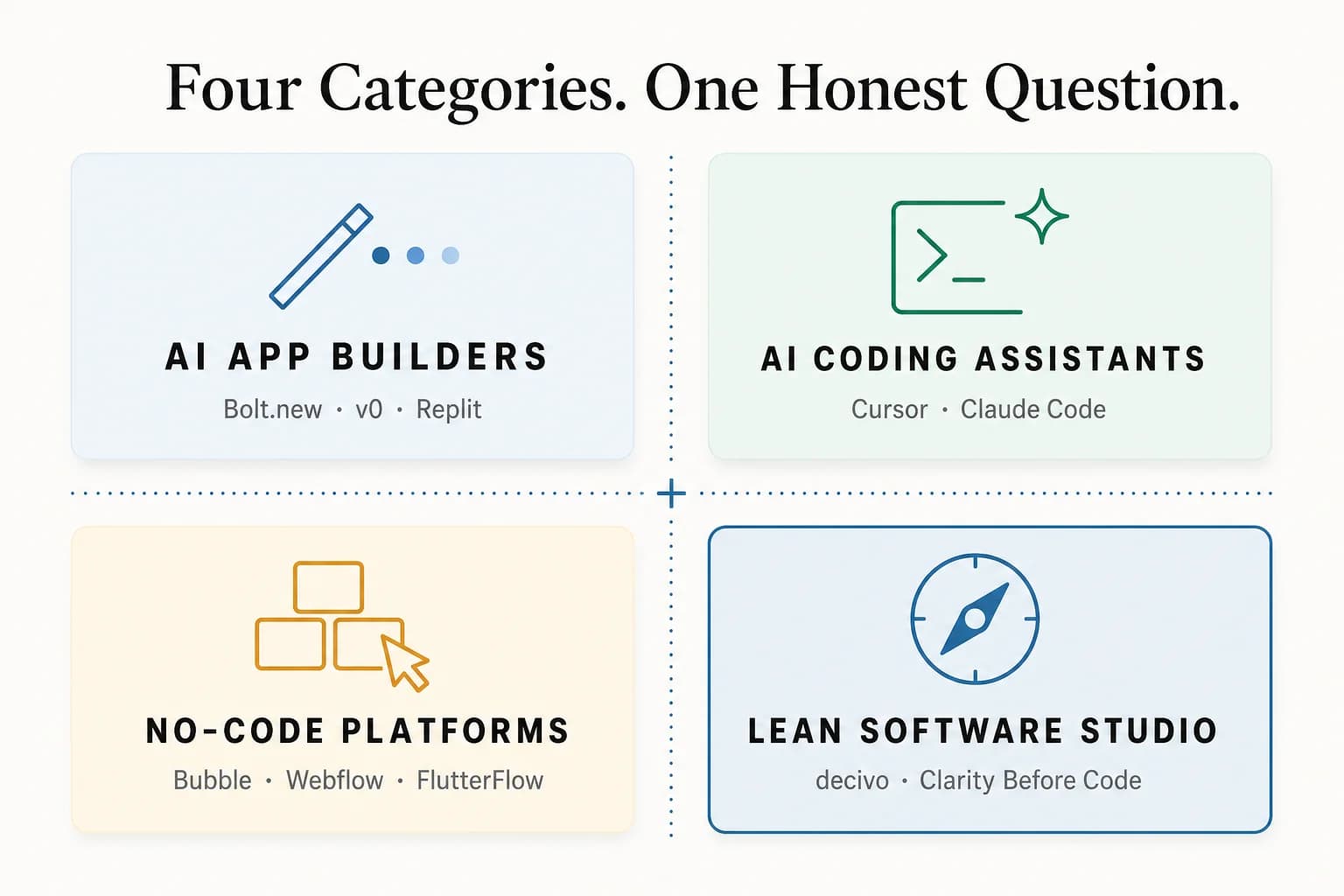
In 2026 the alternatives to Lovable fall into four categories: other prompt-to-app builders (Bolt.new, v0, Replit), classic no-code (Bubble, FlutterFlow, Webflow), AI editors for code you own (Cursor, Claude Code), and a studio that takes over. Before switching, ask honestly: is the tool failing — or can nobody on the team judge the code it produces? Only the first case is solved by changing tools.
TL;DR — the 5 key points
- Lovable is great for prototypes — and hits its limits at the "day-2 problem": React-only, credit burn while debugging, limited backend control.
- Four categories of alternatives: other AI app builders (Bolt.new, v0), AI coding assistants (Cursor + Claude Code), no-code (Bubble, Webflow), Lean Software Studio (e.g. decivo).
- Tool or skill? A different tool fixes feature gaps. Architecture, scaling, or backend issues only get fixed by expertise.
- GDPR advantage with EU stacks: Cursor + Supabase Frankfurt or a studio with EU hosting beats Lovable on US servers.
- Lean Software Studio as the fourth category: Clarity-before-Code Sprint instead of prompt-and-pray. Code belongs to the client.
What Lovable does well — and who should keep using it
Lovable deserves credit. It defined the prompt-to-app category and democratised access to software development. The strengths are real: speed (idea → working app in minutes), visual quality (the generated UIs look professional), low entry barrier (no technical knowledge required), and built-in Supabase integration for database and auth.
For a first prototype, a demo, or a proof of concept, Lovable is still a very good choice. Anyone who wants to test in 30 minutes whether an idea is even clickable shouldn't compare tools for hours — they should just prompt.
This article isn't "against" Lovable. It's for the phase where Lovable has done its job — and you want to know what comes next.
If you're still unsure whether an MVP is the right next step at all: What is an MVP? explains it with examples.
Where Lovable hits its limits — the "day-2 problem"
Difficulties begin once the prototype works and you want to develop it into a real product. We call this the "day-2 problem": day one feels magical, from day two you're fighting the tool. The most common limits:
React-only output
Lovable generates React code only. Anyone needing Vue, Svelte, Angular, or a native mobile app starts over.
Credit burn while debugging
Every prompt consumes credits — even ones that don't fix the problem. Complex bug fixing can become more expensive than the original development.
Limited backend control
Lovable uses Supabase under the hood, but control over schema, Row Level Security, and Edge Functions is limited. Custom API endpoints or complex business logic quickly hit walls.
Vendor lock-in light
The code is yours, but it's optimised for Lovable's architecture decisions. Migrating to your own setup requires significant refactoring.
No real architecture
Generated code lacks clear structure: low test coverage, unclear versioning, tightly coupled files. Fine for a prototype, a hindrance for further development.
This isn't criticism of Lovable. Lovable is a prototyping tool — and as such it works well. The problem arises when you try to use it as a development platform.
The four categories of Lovable alternatives
Not all alternatives solve the same problem. We distinguish four categories — each for a different starting situation:
Category 1
Other AI app builders
Non-technical founders who want to keep prompting
+ Similar simplicity, different features
− Same fundamental limitations
Category 2
AI coding assistants
Technical founders who need control
+ Full code control, real architecture
− Simplicity — you have to be able to code
Category 3
No-code platforms
Anyone who builds visually but wants more control
+ Mature ecosystems, more integrations
− Vendor lock-in, scaling limits
Category 4
Lean Software Studio
Anyone who realised DIY has its limits
+ Professional quality, no in-house tech time, EU hosting, code ownership
− Investment instead of monthly DIY costs
Category 1 — Other AI app builders
If you're broadly happy with Lovable but missing specific features, another AI app builder might be the answer.
Bolt.new — the closest Lovable competitor
Bolt.new is most similar to Lovable: prompt in, working app out. The main difference: Bolt supports more frameworks (React Native, Expo, Vue), has better Git integration, and is WebContainer-based — changes are visible immediately. Token-based pricing can get expensive across many iterations.
Best for: Founders who like the Lovable workflow but need mobile support or more framework flexibility.
v0 by Vercel — best UI generation
v0 isn't a full app builder; it specialises in high-quality UI components based on shadcn/ui and Tailwind. Higher UI quality, seamless Vercel integration, generated code follows established best practices. No backend, no auth — you integrate the components into your own stack.
Best for: Developers who need quality UI scaffolding fast and build the rest themselves.
Replit Agent — everything in the cloud
Replit combines an online IDE with an AI agent. You describe the app, the agent builds it — including backend, database, and deployment. Full IDE in the browser, 50+ languages, deploy directly to Replit infrastructure. Hosting is US-based (GDPR concern), performance can suffer on larger projects.
Best for: Technically curious founders who want to understand the code without setting up a local dev environment.
When another AI app builder solves the problem — and when not. Yes, if your problem is a specific feature gap (mobile, more frameworks, better UI). No, if your problem is the "day-2 problem" — architecture, scalability, or backend control. Other AI app builders share the same fundamental limits. You then need category 2 or 4.
Category 2 — AI coding assistants
If you can code (or are willing to learn), AI coding assistants give you the full control Lovable doesn't — with AI assistance that speeds up the process.
Claude Code — autonomous agentic coding
Claude Code isn't an editor; it's an AI agent that works in the terminal. You describe a feature, Claude Code creates the files, writes the code, tests it, and fixes errors — autonomously. Full control over architecture, tech stack, and code quality, understands project context via a CLAUDE.md file, the code belongs to you.
Best for: Technical founders or small teams with at least one developer building professional software.
Cursor — the AI-native IDE
Cursor is a code editor (based on VS Code) with deeply integrated AI. Unlike Claude Code, you sit in the editor with the AI as a pair programmer next to you. Full IDE experience with AI assistance, smart autocomplete, multi-file editing.
Best for: Developers who want to stay in their familiar editor workflow and use AI as an accelerator.
The combined workflow — Claude Code + Cursor
In practice, Claude Code and Cursor aren't competitors — they complement each other. The most effective workflow combines both: Claude Code for the big blocks (feature architecture, database schema, new pages); Cursor for the fine work (UI tweaks, debugging, small fixes). This is the workflow we use at decivo — Claude Code builds the scaffold, Cursor polishes the details.
Category 3 — No-code platforms
No-code platforms like Bubble, Webflow, and FlutterFlow were the "Lovable" before Lovable. They give you more control than AI app builders, but without code.
Bubble — complex web apps
Bubble is the first choice for complex web apps with custom logic, database relations, and workflows. Steeper learning curve than AI builders. Major drawback: there's no code export — your product lives on Bubble's infrastructure.
Webflow — marketing websites & content
Webflow combines visual web design with CMS functionality. Top-tier SEO features, unmatched design freedom. Limited app logic — more CMS platform than app builder. HTML/CSS export possible, hosting typically stays on Webflow.
FlutterFlow — native mobile apps
If your MVP is a native mobile app, there's no way around FlutterFlow. Real Flutter code export for iOS and Android. Mobile-only, learning curve.
The lock-in problem
Biggest drawback of all no-code platforms: your product lives on their infrastructure. Bubble offers no code export. Webflow's export is limited. If the platform raises prices, removes features, or shuts down, you have a problem. Lovable has an advantage here — the generated code is yours and exportable. But that code is often so unstructured that migration equals rewriting.
Category 4 — Lean Software Studio
Here's the category that doesn't show up in any other "Lovable alternatives" article.
At some point a fundamental question comes up: Is my problem the tool — or is my problem that I should be investing my time in product, customers, and market instead of code?
If you spend 40 hours debugging Lovable as a founder, those are 40 hours not spent talking to customers, working on go-to-market, or validating that the product is even needed.
What a Lean Software Studio does differently than a classic agency
Classic agencies work with large teams, long timelines, and rigid project scopes. A Lean Software Studio is the opposite: small teams (2–4 people), short timelines (2–4 weeks), AI-supported tools (Claude Code, Cursor), validation built into the process, code ownership always with the client.
How we do it at decivo — Clarity Before Code
decivo is a Lean Software Studio with the guiding principle "Clarity Before Code". We validate digital product decisions early with clickable prototypes and code prototypes — before high development costs kick in.
Our packages are tailored exactly to the phase you're in:
€7,500
Innovation Workshop
Sharpen the problem, feature map, clickable prototype included
€3,500
Clickable Prototype
Make the idea testable in Figma — no code, fully validatable
€1,350 per loop
UX Validation Loop
Real-user testing, iterations, decision template
€12,500
Code Prototype
Working code on your own stack (Next.js, Supabase, Vercel) — GDPR-ready, code with the client
€4,500 per loop
Prototype Loop
Iteration on the code prototype with real user feedback
All prices net. Payment package by package per delivery. Details on the services page.
GDPR advantage over Lovable
Lovable hosts on US servers. For DACH startups with personal data, this can become a GDPR problem. We deploy Supabase directly to the Frankfurt region and sign the data processing agreement (DPA). The data stays in the EU.
Big comparison — which alternative fits you?
The choice depends on three factors: your technical knowledge, your budget, and your timeframe. The table makes the trade-offs visible. For a broader tool comparison, see our detailed MVP Tools guide.
| Tool / Studio | Category | Strengths | Weaknesses | Cost | Code ownership |
|---|---|---|---|---|---|
| Lovable | AI Builder | Fastest path to prototype, polished UI | React-only, credit burn while debugging, US hosting | from $20/mo | Code exportable (React) |
| Bolt.new | AI Builder | Multiple frameworks (React Native, Vue), better Git integration | Token-based pricing can get expensive | from $20/mo | Yes |
| v0 (Vercel) | AI Builder | Best UI quality (shadcn/ui), Vercel ecosystem | UI only — no backend | from $20/mo | Yes |
| Replit Agent | AI Builder | 50+ languages, in-browser IDE, cloud deploy | US hosting (GDPR risk), lock-in | from $25/mo | Yes |
| Cursor | AI Coding | AI-native IDE, full code control, any stack | Coding skills required | $20/mo | Full (your code) |
| Claude Code | AI Coding | Autonomous agentic coding, architecture-aware | Terminal-driven, API-based costs | €20–80/mo (usage) | Full (your code) |
| Bubble | No-Code | Mature ecosystem, custom logic, many integrations | No code export, performance limits | from $29/mo | Platform-locked |
| Webflow | No-Code | Top-tier design quality, strong SEO tooling | Limited app logic, hosting bundled | from $14/mo | HTML/CSS export |
| FlutterFlow | No-Code | Native iOS/Android, real Flutter code export | Mobile-only, learning curve | from $30/mo | Yes (Flutter) |
| decivo (Studio) | Studio | Clarity-before-Code Sprint, custom stack, EU hosting, code belongs to client | Investment vs. DIY subscription | Package prices from €3,500 | Full (code with client) |
Decision guide
- You can't code and have little budget: Stay with an AI app builder (Lovable, Bolt, Replit). Switch to Bolt for mobile, to Replit if you want to understand the code.
- You can't code and have budget: Lean Software Studio (e.g. decivo). You invest money instead of time and get a professional result with EU hosting and code ownership.
- You can code and want full control: AI coding assistants — Claude Code + Cursor combined. The most effective workflow for technical founders.
- You want no code lock-in and need many integrations: No-code (Bubble, Webflow). Mature, but platform-bound — plan an exit strategy from the start.
Tool problem or skill problem?
Before switching to an alternative, ask yourself an honest question: is your problem really the tool?
If you hit limits in Lovable because you need a specific feature (e.g. mobile support or a different framework), a tool switch solves your problem.
But if you're constantly fighting with code quality, architecture, performance, or debugging — that's not a tool problem. That's an expertise problem. And no tool in the world solves that. You either need the skills (= learn and use category 2) or a partner who has them (= category 4).
When DIY remains the right choice
- You have more time than money
- You want (or need) to understand the technology yourself
- Your MVP is technically simple (landing page, waitlist, simple CRUD app)
If at least two of these three apply, DIY is right.
When a studio is the right choice
- You have more money than time
- Your strength is sales, marketing, or domain expertise — not technology
- You need a professional result that convinces investors or customers
If at least two of these three apply, a Lean Software Studio is right.
You have a Lovable prototype — what now?
If you already have a Lovable prototype and are thinking about the next phase, there are three realistic paths:
Export and migrate yourself
Export Lovable code and move it into a clean project. Realistic only with coding experience. Plan 1–2 weeks.
Use the prototype as a specification
Don't continue using the Lovable prototype as a code base — use it as a "living wireframe": it shows what the app should do. A studio or developer rebuilds production on a clean stack.
Lovable for demos, build V1 in parallel
Use the Lovable prototype for demos and customer conversations, build the production version professionally in parallel.
Option 2 is the most pragmatic in most cases. The Lovable prototype has done its job — it proved the idea works. Now build properly.
If you want to take this transition with a studio: Book a discovery call — we look at your prototype and tell you honestly whether a Code Prototype from €12,500 is the right next step or whether you'll learn more first with a UX Validation Loop for €1,350.
Related tool
Already built an app with Lovable or an alternative? Before you switch or go live, take the honest look: is it technically production-ready — or are there security gaps and open databases inside? Our free Vibe Code Rescue scan checks your app in minutes and shows the critical findings.
Sources
The feature and pricing figures in this comparison come from the vendors' own pages (as of August 2026). Prices change often — always check the linked original before deciding.
FAQ
Frequently asked questions about Lovable alternatives
What is the best alternative to Lovable?
There's no single best alternative — the right choice depends on your situation. Four categories make sense: other AI app builders (Bolt.new, v0, Replit) for founders who want to keep prompting. AI coding assistants (Cursor + Claude Code) for technical founders who need full code control. No-code platforms (Bubble, Webflow, FlutterFlow) for visual builders. A Lean Software Studio like decivo when you'd rather invest your time in product and market than tool selection.
Can I export my Lovable code?
Yes. Lovable supports React code export. The generated code is often unstructured though: tight coupling, low test coverage, unclear architecture. Continuing development on top of it is possible but expensive. Many teams treat the Lovable prototype as a specification and rebuild the production version on a clean stack.
Lovable or Bolt.new — which is better?
Bolt.new is Lovable's closest competitor. Key differences: Bolt supports more frameworks (React Native, Vue), better Git integration, and token-based pricing. Lovable has tighter Supabase integration and often produces more polished UI. Both share the same fundamental limit: prompt-based code without real architecture.
Lovable or Cursor — which is better?
Comparing two different categories. Lovable is an AI app builder for non-technical users — prompt in, app out. Cursor is an AI-native IDE for developers — you write code with AI assistance. Lovable is simpler; Cursor offers more control. Coders are better off with Cursor. Non-coders need Lovable, a no-code tool, or a studio.
Is Lovable GDPR-compliant?
Lovable hosts on US servers. For DACH startups processing personal data, this can be problematic — especially without standard contractual clauses and without an EU region option. Alternatives like Cursor + Supabase in the Frankfurt region (eu-central-1) or a studio like decivo offer EU hosting plus a data processing agreement. For a precise legal assessment, consult a data protection expert.
What does it cost to switch from Lovable to an alternative?
Depends on the target. To another AI app builder (Bolt.new, v0): practically free, just the new subscription. To Cursor + Claude Code: €40–100/month plus your own migration time. To a studio like decivo: from €3,500 net for a Clickable Prototype, from €12,500 net for a Code Prototype — on your own stack, EU-hosted, with full code ownership.
Can I use Lovable and Cursor in parallel?
Yes — and it's pragmatic. Lovable stays in use for fast demo prototypes and investor pitches, while the production version is built with Cursor and Claude Code on a clean stack. The Lovable prototype works as a visual specification; the production version is built professionally.
When is a Lean Software Studio worth it instead of a tool?
When your time is more expensive than the studio investment. Rule of thumb: 40 hours spent debugging Lovable as a founder are 40 hours not spent talking to customers, working on go-to-market, or validating that the product is even needed. A studio like decivo runs the Clarity-before-Code Sprint and ships a professional, validated product — the code belongs to the client, the stack is GDPR-friendly, and the investment outcome is measurable.
Related articles
22 min read
Vibe Coding: From Prototype to Product 2026 — What Comes After the First Prompt
Vibe-code MVP works but the code is chaos? 4-stage maturity scale, Stack of Truth, Clarity Retrofit workflow with prompts, before/after code, and 3 paths to production-grade software.
Read article16 min read
Is AI-Generated Code Production-Ready? What the 2026 Studies Actually Say
Our own study: 12 MVP features from a naive prompt meet only 19.6% of production-readiness controls in chat coding, 47.1% with the newest agent (Codex) — 0 of 12 ready. Plus every major 2026 study (Veracode, GitClear, METR) and the 5-question Build-On Test.
Read article20 min read
MVP Tools 2026: The Best Tools Compared
No-code, AI app builders, Claude Code & Cursor — all MVP tools compared. Costs, workflows & decision guide.
Read articleStuck between Lovable and a "real" product?
We help with the handover — Clarity Before Code. Book a 15-minute discovery call. No sales, just an honest take on what your next step is.
Free · 15 minutes · No sales tactics